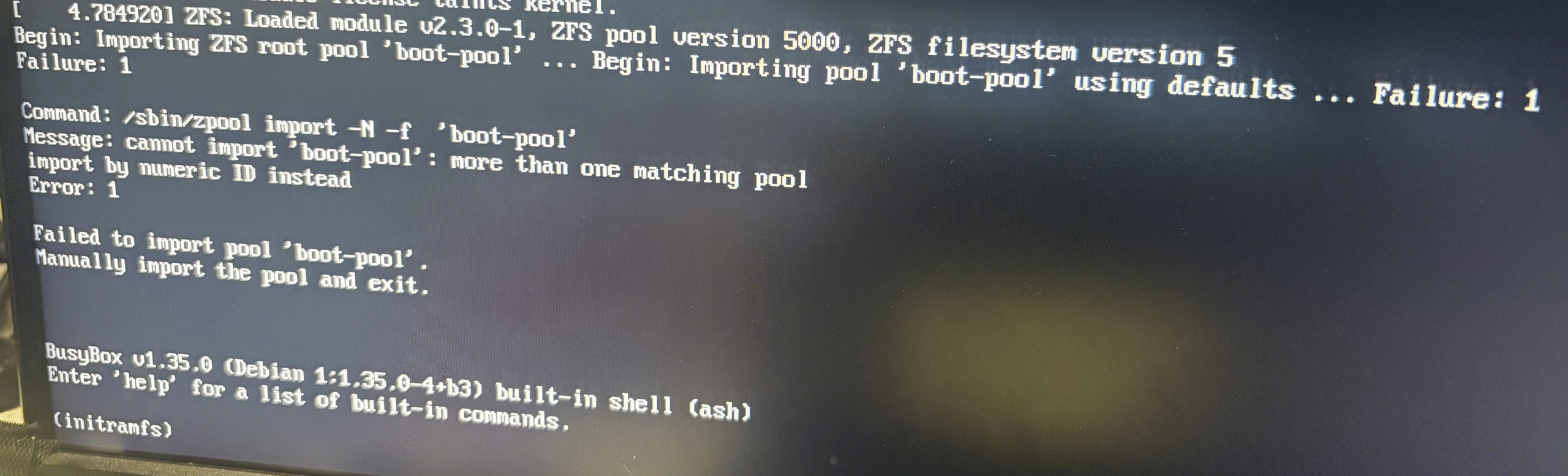
TrueNasで、24.10.2.4から25.04.x.y系にUpgradeすると、再起動時にboot-poolが見つからない旨のエラーが出て、Bootできない状況に陥った。
Begin: Importing ZFS root pool ‘boot-pool’… Begin: Importing pool ‘boot-pool’ using defaults … Failure: 1 Failure: 1
色々ググってみても、ずばりの記事がないが、各記事の雰囲気は、Diskをフォーマットすればよいような記載であったが、何となくそこまでする必要はないように思えて、少し戦ってみた。
上記エラーが出て止まっている状態で、/sbin/zpool import と打つとsde4のboot-poolがNGで、sde3のboot-poolがONLINEと表示されている。そこでそのまま、/sbin/zpool import -N -f (ID)を入力し、exitすると無事にTrueNasが起動した。(ID)はsde3の項目に表示されている数字。()は入力しなくてよいです。
しかしながら、再起動させるとやはり同じエラーを表示して止まってしまう。根本解決を考えてみることとした。
根本原因は、boot-poolが2つあるということだと推定。sde4にあるboot-poolを削除できればよいのではないかと考えた。
再起動させ、起動するバージョン選択で動いていた24.10.2.4を選択してひとまずシェルを動かせるようにし、sudo fdisk -lを使ってひとまずBootに使用しているデバイスを確認してみた。
Device Start End Sectors Size Type
/dev/sdf1 4096 6143 2048 1M BIOS boot
/dev/sdf2 6144 1054719 1048576 512M EFI System
/dev/sdf3 34609152 488397134 453787983 216.4G Solaris /usr & Apple ZFS
/dev/sdf4 1054720 34609151 33554432 16G Linux swap
デバイスがsdeからsdfに代わっているのは別件として、Linux swap領域を削除して、再度Linux swapパーティションを作成すればよいのではと思い、sudo fdisk /dev/sdfを実行後に下記fdiskのコマンドを実行してパーティションの削除、作成を行った。
Command (m for help): d
Partition number (1-4, default 4):
Partition 4 has been deleted.
Command (m for help): n
Partition number (4-128, default 4):
First sector (34-34609151, default 1054720):
Last sector, +/-sectors or +/-size{K,M,G,T,P} (1054720-34609151, default 34609151):
Created a new partition 4 of type ‘Linux filesystem’ and of size 16 GiB.
Command (m for help): t
Partition number (1-4, default 4):
Partition type or alias (type L to list all): 19
Changed type of partition ‘Linux filesystem’ to ‘Linux swap’.
Command (m for help): w
The partition table has been altered.
Syncing disks.
この状態で、再起動すると無事に24.04.2.4が起動するようになった。
この対応が正しいのか不明だし、パーティションの削除を伴う方法なので、保証はできないことをご了承ください。

コメント